
NolimitHost
0%
Loading...
NolimitHost
Last updated: January 24, 2026
In this guide, you will learn how to allow players with non-premium Minecraft accounts to join your server. Non-premium accounts are accounts without a paid Minecraft license. This is done by disabling online-mode in the server's main configuration file.
https://panel.nolimithost.cc/ and select your Minecraft server. Go to Management > File Manager — this is where you can view and edit all of your server's files.server.properties in Quick Access on the right. If it's not there, scroll through the file manager to find it manually. This file is the main server configuration file where most of your server's settings are stored.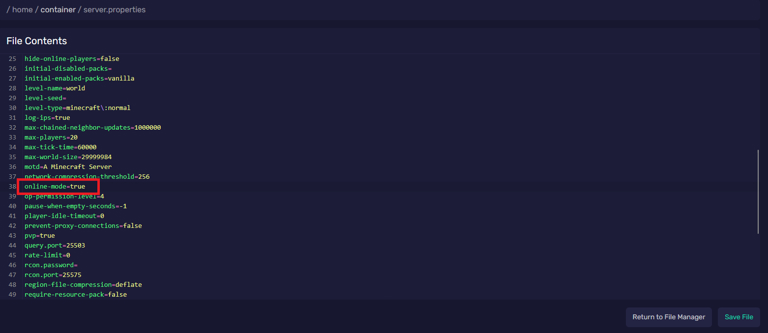
server.properties file. Find online-mode and set it from true to false.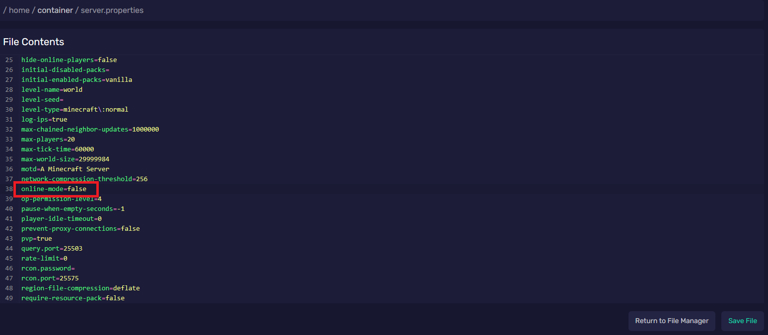
Save the file, restart the server, and enjoy it with your friends without any limits.
online-mode disabled, anyone can join your server using any username, including the name of a moderator or an admin. Only use this setting if you understand the risk, and consider using a whitelist or permissions plugin to protect your server.
This website uses cookies to ensure security, session management, and basic functionality. For details on all cookies used and how to manage your preferences, please see our Privacy Policy.



